

Tray
Trayless
Custom Size
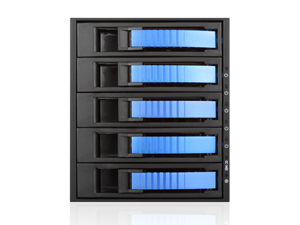


BPU-350SATA
3x 5.25" to 5x 3.5" 2.5" SAS SATA 6 Gbps HDD SSD Hot-swap Rack
3x 5.25" to 5x 3.5" 2.5" SAS SATA 6 Gbps HDD SSD Hot-swap Rack
- Stylish aluminum color handle and heat-sink body
- Support Hot-Swap & RAID Configuration (need an additional RAID controller)
- Aluminum Design with Conductive Dissipation Grooves
- Power, fan and high temperature LED indicators
- High Performance Transfer Rate up to 6.0 Gb/s
- Supports Both 2.5" and 3.5" SAS I/II & SATA I/II/III HDDs
- Equipped with Fan Speed Control Switch
- 12TB Hard Drives Compatible


Product Introduction
High level RAID and high availability storage in compact design, BPU-350SATA series adds extra storage and hot-swap capability to satisfy any application needs. The BPU-350SATA is constructed of aluminum material that provides best heat dissipation required for high performance SAS/SATA drives. It is designed with excellent front to back vent airflow. The BPU-350SATA is an ideal solution for internal server RAID and JBOD applications. Aluminum body and extra 80mm cooling fan subsystem complete a high end data storage server or workstation.
High level RAID and high availability storage in compact design, BPU-350SATA series adds extra storage and hot-swap capability to satisfy any application needs. The BPU-350SATA is constructed of aluminum material that provides best heat dissipation required for high performance SAS/SATA drives. It is designed with excellent front to back vent airflow. The BPU-350SATA is an ideal solution for internal server RAID and JBOD applications. Aluminum body and extra 80mm cooling fan subsystem complete a high end data storage server or workstation.
| Specifications | Download | FAQ |
| Optional Accessories | Compatible Power Supplies | Compatible Motherboards |
| Compatible Chassis |  |
Product Reviews |
| Model Number | BPU-350SATA |
| RoHS Compliance | Yes |
| Standard Drive Bays |
Hotswap 3.5": 5 5.25" Drives: 3 |
| Hotswap HDD Type: | 3.5" SAS I/II & SATA I/II/III |
| Indicators | Power, HDD, fan, and high temperature |
| Material of Front Bezel | Aluminum |
| Material of Handle | Aluminum |
| Material of Main Chassis | Aluminum Design with Conductive Dissipation Grooves |
| Color of Front Bezel | Black/ Blue/ Red/ Silver |
| Color of Main Chassis | Black |
| Package Content | SATA Cable Included (5pcs) |
| Cooling Fan | 1x80mm |
| Ordering Information (Part Number) | Black Tray:BPU-350SATA-BLACK Blue Tray:BPU-350SATA-BLUE Red Tray:BPU-350SATA-RED Silver Tray:BPU-350SATA-SILVER Lockable Tray:BPU-350SATA-BPL |
| Dimensions (WxHxD) | 5.75" x 4.96" x 8.25" 146.0 mm x 126.0 mm x 209.5 mm |
FAQ
| Q : | Does BPU series storage enclosure support staggered spin-up? |
| A : | Generally staggered spin-up is supported by host controller and/or through motherboard Bios. BPU storage enclosure provides pass through connection with environment monitoring, itself do not contain drive controller function. |
| Q : | Why is the BPU-350 not turned on? |
| A : | The BPU-350 has power switches for each individual drive. To power on the drives, use a pin to push the power switch. |
| Q : | Is there a way to regulate the speed of the fan by temperature on BPU-350SATA? |
| A : | It is unable to regulate by temperature due to the design only providing high/low adjustment. |
Optional Accessories
| Model # | Description | |
 | BPU-HSTRAY | BPU Series and T-7M1-SATA Tray with Plastic Lockable Handle |
 | BPU-HSTRAY-BLACK | BPU Series and T-7M1-SATA Tray with Aluminum Handle BLACK |
 | BPU-HSTRAY-BLUE | BPU Series and T-7M1-SATA Tray with Aluminum Handle BLUE |
 | BPU-HSTRAY-RED | BPU Series and T-7M1-SATA Tray with Aluminum Handle RED |
 | BPU-HSTRAY-SILVER | BPU Series and T-7M1-SATA Tray with Aluminum Handle SILVER |
 | BPU-HSTRAY-35TL | Build-to-Order - BPU Series and T-7M1-SATA Tool-Less Screw-less 3.5" HDD Tray |
 | BPU-HSTRAY-25TL | Build-to-Order - BPU Series and T-7M1-SATA Tool-Less Screw-less 2.5" HDD Tray |
Compatible Power Supplies
| Model # | Description | Required Bracket(s) |
Compatible Motherboards
| Model # | Motherboard Size | Company Name |
There are no compatibility motherboard for this model. | ||
Compatible Chassis
| Model # | Description | |
 | D2-400-6 | 4U Compact Stylish Rackmount Chassis |
 | D2-400-7-BLUE | 4U Compact Stylish Rackmount Chassis |
 | D2-400L-M10SA | Build-to-Order - 4U 10 Hot-Swappable Rackmount Chassis |
 | D-400-6 | 4U Compact Stylish Rackmount Chassis |
 | D-400-6SE | 4U Compact Stylish Rackmount Chassis |
 | D-400A-6 | Build-to-Order - 4U Compact Stylish Aluminum Rackmount Chassis |
 | D-400ASE | Build-to-Order - 4U Compact Stylish Aluminum Rackmount Chassis |
 | D-400-JB | Build-to-Order - 4U Disk Array JBOD Storage Rackmount Chassis |
 | D-400L-7 | 4U High Performance Rackmount Chassis |
 | D-400L-7SE | 4U High Performance Rackmount Chassis |
 | D-400SE | 4U Compact Stylish Rackmount Chassis |
 | D-410 | 4U 10-Bay Stylish Storage Server Rackmount |
 | D-414 | 4U 14 Slots Industrial PC Rackmount Chassis |
 | D-414L-7 | 4U 14 Slots Industrial PC Rackmount Chassis |
 | D-416 | 4U Compact Stylish Rackmount Chassis |
 | D-416-2B126SA | Build to Order - 4U Compact Stylish Rackmount Chassis 12 x 2.5" Hotswap Drives PS2 PSU |
 | D-416-3B124 | Build to Order - 4U Compact Stylish Rackmount Chassis 12 x 2.5" Hotswap Drives PS2 PSU |
 | D-416-B5SA | 4U Compact Stylish Rackmount Chassis 5 x 3.5" Hotswap Drives PS2 PSU |
 | E-306L | 3U E-ATX 6 x 5.25" Bays Rackmount Chassis |
 | D-416-DT | 4U Compact Stylish Server/Desktop Chassis |
 | D-420L-FS | Build-to-Order - 4U 20 Slots Industrial PC Rackmount Chassis Front-mounted ATX Power Supply |
 | D-420L-FR | Build-to-Order - 4U 20 Slots Industrial PC Rackmount Chassis Front-mounted Redundant Power Supply |
 | D-407SE-TS859 | 4U Compact Stylish Rackmount Chassis with 8" Touch Screen LCD |
 | D-407LSE-TS859 | 4U High Performance Rackmount Chassis with 8" Touch Screen LCD |
 | D-407SE14-TS859 | 4U 14-slot Compact Stylish Rackmount Chassis with 8" Touch Screen LCD |
 | D-407LSE14-TS859 | 4U 14-slot High Performance Rackmount Chassis with 8" Touch Screen LCD |
 | D-413ASE | Build-to-Order - 4U Compact Aluminum Stylish Rackmount Chassis |
 | D7-400-6-SL | Build-to-Order - 4U Compact Stylish Rackmount Chassis Silver |
 | S-915 | Compact Stylish 5x 5.25" Bay mini-ITX Tower |
 | E-306V2-L | 3U E-ATX 6 x 5.25" Bays Rackmount Chassis |
 | D-400SEA | 4U Compact Stylish Rackmount Chassis with SEA Bezel |
 | S-917 | Compact Stylish 7x 5.25" Bay mini-ITX Tower |
 | D-400 | 4U Compact Stylish Rackmount Chassis |
 | D-400-P | 4U Compact Stylish Rackmount Chassis |
 | S-31-JB | Build-to-Order - Compact Stylish 3x 5.25" Bay JBOD Tower |
 | EB-2101-ITX | Build-to-Order - 4 x 2.5" Bays Industrial Embedded Chassis |
 | S-35EX | Compact Stylish 3x 5.25" Bay mini-ITX Tower |
 | D-416-500R8PD8 | 4U Compact Stylish Rackmount Chassis with 500W Redundant Power Supply |
 | D-407L-500R8PD8 | 4U High Performance Rackmount Chassis with 500W Redundant Power Supply |
 | S-917-500R8PD8 | Compact Stylish 7x 5.25" Bay mini-ITX Tower with 500W Redundant Power Supply |
 | D-416-DE4 | 4U Compact Stylish 4x3.5" Trayless Hotswap Rackmount Chassis |
 | D-407LSE-50R8PD8 | 4U High Performance Rackmount Chassis with 500W Redundant Power Supply |
 | D-400-50R8PD8 | 4U Compact Stylish Rackmount Chassis with 500W Redundant Power Supply |
 | D-400SE-50R8PD8 | 4U Compact Stylish Rackmount Chassis with 500W Redundant Power Supply |
 | D-400SEA-50R8PD8 | 4U Compact Stylish Rackmount Chassis with 500W Redundant Power Supply |
 | D-406-50R8PD8 | 4U Compact Stylish Rackmount Chassis with 500W Redundant Power Supply |
 | D-406SE-50R8PD8 | 4U Compact Stylish Rackmount Chassis with 500W Redundant Power Supply |
 | D-410-50R8PD8 | 4U 10-Bay Stylish Storage Server Rackmount with 500W Redundant Power Supply |
 | DN-300 | 3U 5.25" 3-Bay Compact microATX Chassis |
 | DN-400 | 4U 5.25" 4-Bay Compact ATX Chassis |
 | DN-300-35P3 | 3U 5.25" 3-Bay Compact microATX Chassis with 350W Power Supply |
 | DN-300-50P8 | 3U 5.25" 3-Bay Compact microATX Chassis with 500W Power Supply |
 | DN-300-70P8B | 3U 5.25" 3-Bay Compact microATX Chassis with 700W Power Supply |
 | DN-300-50R8PD8 | 3U 5.25" 3-Bay Compact microATX Chassis with 500W Redundant Power Supply |
 | DN-300-40R8P | 3U 5.25" 3-Bay Compact microATX Chassis with 400W Redundant Power Supply |
 | DN-300-55R8P | 3U 5.25" 3-Bay Compact microATX Chassis with 550W Redundant Power Supply |
 | DN-400-50P8 | 4U 5.25" 4-Bay Compact ATX Chassis with 500W Power Supply |
 | DN-400-70P8B | 4U 5.25" 4-Bay Compact ATX Chassis with 700W Power Supply |
 | DN-400-50R8PD8 | 4U 5.25" 4-Bay Compact ATX Chassis with 500W Redundant Power Supply |
 | DN-400-40R8P | 4U 5.25" 4-Bay Compact ATX Chassis with 400W Redundant Power Supply |
 | DN-400-55R8P | 4U 5.25" 4-Bay Compact ATX Chassis with 550W Redundant Power Supply |
 | D-400-50R8PD2 | 4U Compact Stylish Rackmount Chassis with 500W Redundant Power Supply |
 | D-406-50R8PD2 | 4U Compact Stylish Rackmount Chassis with 500W Redundant Power Supply |
 | D-407L-50R8PD2 | 4U High Performance Rackmount Chassis with 500W Redundant Power Supply |
 | D-416-50R8PD2 | 4U Compact Stylish Rackmount Chassis with 500W Redundant Power Supply |
 | D-410-50R8PD2 | 4U 10-Bay Stylish Storage Server Rackmount with 500W Redundant Power Supply |
 | D-407L-50R8A | 4U High Performance Rackmount Chassis with 500W Redundant Power Supply |
 | D-407L-55R8P | 4U High Performance Rackmount Chassis with 550W Redundant Power Supply |
 | D-407L-80R3N | 4U High Performance Rackmount Chassis with 800W Redundant Power Supply |
 | D-407L-100R3N | 4U High Performance Rackmount Chassis with 1000W Redundant Power Supply |
 | D-406-50R8A | 4U Compact Stylish Rackmount Chassis with 500W Redundant Power Supply |
 | D-406-55R8P | 4U Compact Stylish Rackmount Chassis with 550W Redundant Power Supply |
 | D-406-80R3N | 4U Compact Stylish Rackmount Chassis with 800W Redundant Power Supply |
 | D-406-100R3N | 4U Compact Stylish Rackmount Chassis with 1000W Redundant Power Supply |
 | E-306L-80R3K | 3U E-ATX 6 x 5.25" Bays Rackmount Chassis with 800W Redundant Power Supply |
 | E-306L-95R3K8 | 3U E-ATX 6 x 5.25" Bays Rackmount Chassis with 950W Redundant Power Supply |
 | D2-407-BL-50R8P8 | 4U Compact Stylish Rackmount Chassis with 500W Redundant Power Supply |
 | D2-407-BL-55R8P | 4U Compact Stylish Rackmount Chassis with 550W Redundant Power Supply |
 | D-402A-14 | Build-to-Order 4U 14 Slots Industrial PC Rackmount Chassis |
 | D-403A-14 | Build-to-Order 4U 14 Slots Industrial PC Compact Rackmount Chassis |
 | D2-400-7-SY | 4U Compact Stylish Rackmount Chassis |
 | D-400SEA-BK-50R8PD8 | 4U Compact Stylish Rackmount Chassis with 500W Redundant Power Supply |
 | D-400SEA-RD-50R8PD8 | 4U Compact Stylish Rackmount Chassis with 500W Redundant Power Supply |
 | D-400SEA-SL-50R8PD8 | 4U Compact Stylish Rackmount Chassis with 500W Redundant Power Supply |
 | D-400SEA-BK-RAIL24 | 4U Compact Stylish Rackmount Chassis with black SEA Bezel and 20" Sliding Rail Kit |
 | D-400SEA-BL-RAIL24 | 4U Compact Stylish Rackmount Chassis with blue SEA Bezel and 20" Sliding Rail Kit |
 | D-400SEA-RD-RAIL24 | 4U Compact Stylish Rackmount Chassis with red SEA Bezel and 20" Sliding Rail Kit |
 | D-400SEA-SL-RAIL24 | 4U Compact Stylish Rackmount Chassis with silver SEA Bezel and 20" Sliding Rail Kit |
 | D-400SEA-BK-T7SA | 4U Compact Stylish Rackmount Chassis with black SEA Bezel and with rugged 5.25" to 3.5" SATA SAS 6 Gbps HDD Hot-swap Rack |
 | D-400SEA-BL-T7SA | 4U Compact Stylish Rackmount Chassis with blue SEA Bezel and with rugged 5.25" to 3.5" SATA SAS 6 Gbps HDD Hot-swap Rack |
 | D-400SEA-RD-T7SA | 4U Compact Stylish Rackmount Chassis with red SEA Bezel and with rugged 5.25" to 3.5" SATA SAS 6 Gbps HDD Hot-swap Rack |
 | D-400SEA-SL-T7SA | 4U Compact Stylish Rackmount Chassis with silver SEA Bezel and with rugged 5.25" to 3.5" SATA SAS 6 Gbps HDD Hot-swap Rack |
Featured Videos
 | Description: iStarUSA Compact Stylish Rackmount Chassis D2-400-7BLUE Products: D2-400-7BLUE, BPN-DE340SS, BPU-350SATA, BPU-2535V2 |
SUPPORT

Providing technical support as our top priority.
Contact us today!
tech support contact info:
Tel: 1-626-303-8885
Product Support Request
Contact us today!
tech support contact info:
Tel: 1-626-303-8885
Product Support Request